Live usage limits for Claude Code and Codex, in the Windows tray.
See a limit coming before it stops you mid-task. One icon per limit, drawn the way Core Temp shows per-core CPU values — read from the services themselves, so the numbers are not an estimate, and checking them costs no model tokens.
- 377 KB, one file
- MIT, open source
- No telemetry, one endpoint by default
- Claude Code + Codex
Windows 10 or 11, and the .NET 9 Desktop Runtime — not bundled, so install it first if you do not have it.
Three rules, and nothing else to learn
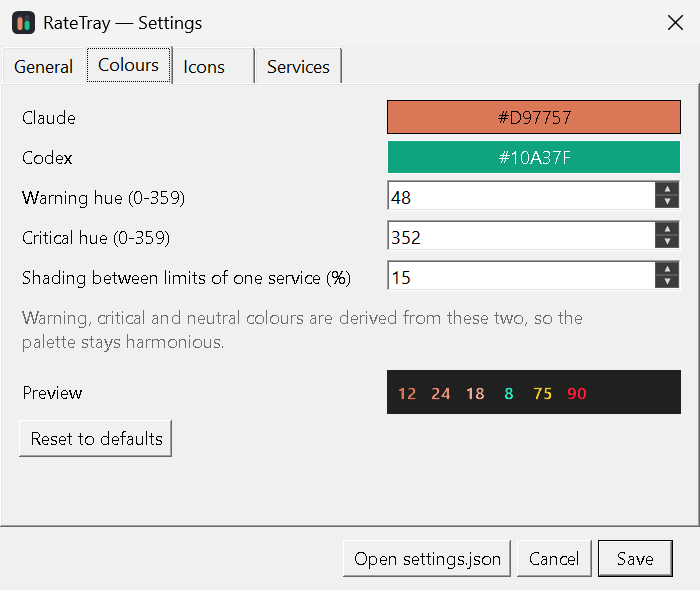
Watch the second number above climb past 75. Below the warning threshold a value carries its service's colour, shaded apart from the other limits of that service. Above it, severity takes over for everything — so a warning never depends on knowing which colour belongs to which service.
Colour is the second channel, never the only one: the percentage is always on the icon, the hover card names the limit, and both thresholds are yours to move.
Service colour. Terracotta for Claude, green for Codex — that is what tells the icons apart at a glance.
Amber, for every service and every limit. One colour, one meaning.
Crimson. Both thresholds are yours to move, and so are the two service colours.
Claude
Sign-in: valid until Thu Aug 6, 00:13 (3 h 35 min left) · OAuth
Codex
Sign-in: valid until Fri Aug 14, 23:01 (9 d 2 h left) · chatgpt
Updated 20:37:42 · every 90 s · Esc closes
Read from the services, not guessed
| Claude | The OAuth usage endpoint, using the token Claude Code already keeps on disk. |
|---|---|
| Codex | codex app-server over JSON-RPC, on the machine, no network call of our own. |
Which limits exist depends on your plan, so the icon set is discovered from your account on first run rather than hardcoded. A failed poll keeps the last numbers on screen and backs off instead of blanking the tray.
Everything adjustable, nothing required
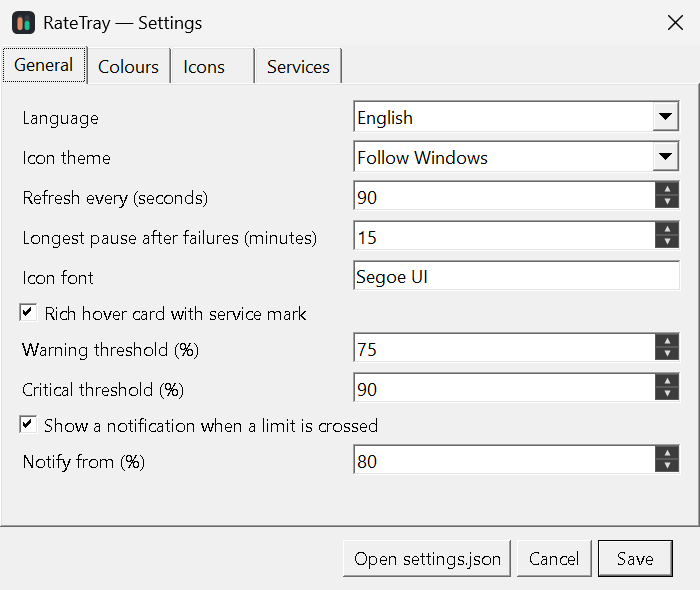
Right-click → Open settings. The colours tab previews the actual tray icons as you change them, derived palette included.
One file, no installer
Download RateTray.exe
and run it. Every release ships a SHA-256 checksum next to the binary.
Windows 11 hides new tray icons behind the arrow until you drag them onto the taskbar. That catches most people once.
- System
- Windows 10 or 11
- Runtime
- .NET 9 Desktop Runtime
- Signed in to
- Claude Code, Codex, or both
- Licence
- MIT
- Languages
- English, German
Two files read, one address by default
Credentials are read from the files the official CLIs already maintain, and are never copied, logged, or sent anywhere else. As shipped there is one destination — Anthropic's usage endpoint — and Codex data never leaves your machine at all. No telemetry; the only extra is an optional update check, off by default, that asks GitHub for the version once a day if you turn it on.
That address is a setting rather than a constant, so that an endpoint which moves can be corrected without a new build. Which is why a credential only ever travels over https, and an endpoint other than the default is named in the app: changing where the numbers come from stays a visible choice.
You should not take any of that on trust. This reads your credential files, and it was written by an AI coding agent under human direction with no independent human review — a combination worth being sceptical about. Which is the useful thing about 377 KB and 4,900 lines of C#: it is small enough to read yourself before you run it.